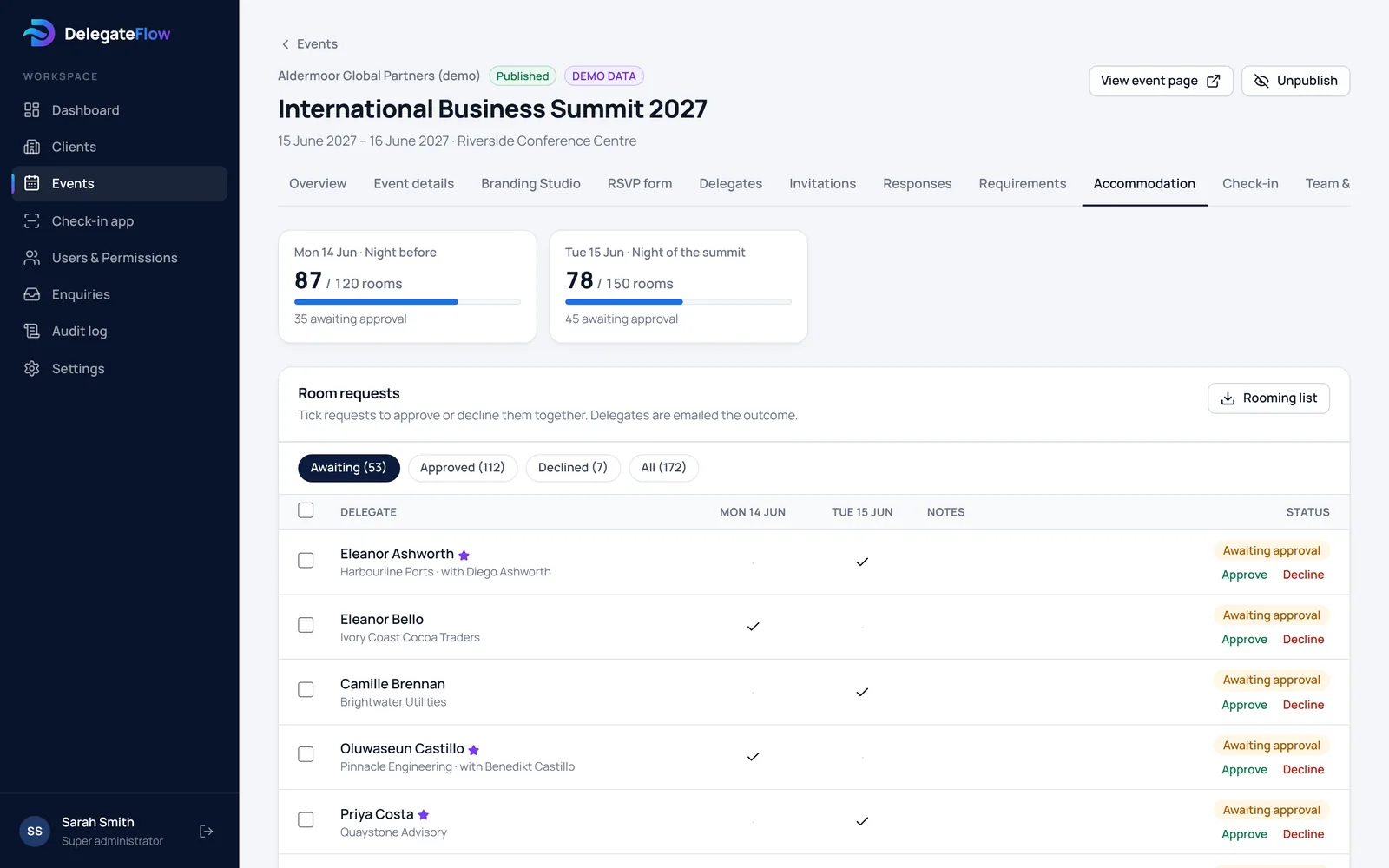
Offer the nights you’ve booked
Add each night you have rooms for — the night before, the night of the event, or any others — with an optional room limit to match your hotel block. Offer accommodation to everyone who accepts, or only to selected delegates such as VIPs, speakers or a particular guest category.
- Any number of nights
- Room limits per night
- Offer to everyone or selected delegates
Guests choose their nights when they reply
An accommodation section appears on the reply form with the hotel details you provide and a tick box for each night. Guests can add a note for the hotel, such as a late arrival. If they change their nights later, the request goes back for approval.
Approve automatically, yourself, or with a colleague
Choose how requests are confirmed: automatically, by your event team, or by a colleague with a reports view. Approve or decline many requests at once, add a message, and each guest is emailed the outcome.
Room totals for each night are shown against your limits, so you can see straight away if you’re close to your block.
- Bulk approve and decline
- Automatic emails to guests
- Totals per night against your limits
A rooming list for the hotel
Download the approved requests as a spreadsheet: one row per guest, one column per night, with the guests they’re bringing, notes and totals per night.
Common questions
Can we offer rooms to only some delegates?
Yes. Offer accommodation to everyone who accepts, or only to selected delegates — individually or by group, such as VIPs or a guest category.
Who approves room requests?
You choose for each event: requests can be confirmed automatically, by your event team, or by a colleague with a reports view.
Are guests told when a request is approved?
Yes. When a request is approved or declined the guest is emailed automatically, including any message you add.
What does the hotel receive?
A rooming list you download as a spreadsheet, with approved guests, the nights they’re staying, anyone they’re bringing and any notes.
More of what DelegateFlow does
See it with your next event.
We’ll walk you through an event from invitation to arrival, and show you how it would work for yours.